YouWare Review - Complete Directory Informations
Basic Information
Tool Name: YouWare (AI Coding Platform)
Category: AI Coding, No-code Development, Web Development, Productivity
Type: Web App, Browser Extension (IDE Plugin)
Official Website: https://www.youware.com/
Developer/Company: YouWare (Founded by Leon Ming)
Launch Date: May 28, 2025
Last Updated: Major update in May 2025 (MCP integration, points system)
Quick Overview
One-line Description: Transform ideas into live websites and apps instantly with AI, no coding required.
What it does: YouWare is an AI-powered platform that enables creators to build interactive websites, applications, and games by simply describing their vision in natural language, uploading screenshots, or integrating Figma designs. It converts these inputs into functional code, offers real-time previews, and supports one-click deployment to a live URL.
Best for: Creators, designers, marketers, entrepreneurs, small businesses, and anyone looking to rapidly prototype, build, and deploy digital projects without extensive technical or coding skills.
Key Features
- AI-Powered Code Generation: Converts natural language prompts, screenshots, or Figma designs into functional HTML, CSS, and JavaScript code for websites and apps.
- Prompt-to-Website/App Generation: Users can describe their desired project (e.g., "a sleek portfolio with dark theme") and the AI generates a functional draft instantly.
- Vibe Coding Interface: An intuitive and user-friendly platform that simplifies the development process, making it accessible to beginners.
- One-Click Deployment: Instantly publishes projects to a live, shareable URL, eliminating the complexities of hosting.
- Built-in Design Enhancements (Boost Feature): AI suggests and applies improvements to make designs more polished and professional, enhancing UI/UX.
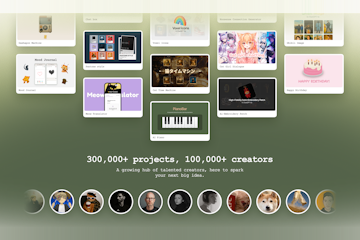
- Remixable Community Ecosystem: Users can explore projects built by others, gain inspiration, and fork (remix) public creations to build upon them, fostering collaboration.
- IDE Extensions: Offers plugins for popular Integrated Development Environments like VS Code and Cursor for direct publishing and seamless workflow.
- Figma Integration via MCP: Connects Figma designs directly and converts layouts into functional, viewable websites, streamlining design-to-development.
- Backend Project Features: Supports the creation of backend functionalities including databases, APIs, and user authentication for full-stack applications.
- Privacy Controls: Allows users to choose public, private, or password-protected access for their projects.
Pricing Structure
Free Plan:
- What's included in free tier: Access to basic AI coding features, project creation, community interaction, and instant deployment.
- Usage limits: Limited number of projects per month and operates on a credit system. Users receive 500 sign-up credits.
- Number of users/projects allowed: Includes 1 backend project.
Paid Plans:
- Pro Plan: $20/month - Offers more credits, 4-250 backend projects (extended duration), code download for original files, full-screen sharing, priority access during high demand, unlimited code uploads, unlimited project sharing, and early access to new features.
- Enterprise: Information not available (contact for quote implied by scaling for large-scale projects).
Free Trial: The Free Plan serves as an extensive free trial, offering initial credits and core functionalities without a time limit.
Money-back Guarantee: Information not available.
Pricing Plans Explained
Free Plan
What you get: This plan provides a taste of YouWare's core capabilities, allowing you to create simple websites and applications using AI-powered tools. You receive 500 credits upon signing up, which are used for generating AI code and features. You can also get an additional 500 credits for inviting a friend and 100 daily login bonus credits. You can host one backend project.
Perfect for: Beginners, students, curious creators, and anyone who wants to experiment with AI coding and no-code web development without a financial commitment. It's ideal for prototyping small projects or learning the platform.
Limitations: Usage is restricted by the number of credits and projects per month. Features like downloading generated code and priority access are not included.
Technical terms explained: "Credits" are a form of in-app currency used to utilize YouWare's AI generation capabilities. "Backend project" refers to the server-side logic and database of an application, as opposed to the front-end visual interface.
Pro Plan - $20/month
What you get: The Pro Plan significantly expands your capabilities with YouWare. You receive a larger allocation of credits, enabling more extensive AI-powered development. It allows for 4-250 backend projects with extended durations, making it suitable for more complex or numerous applications. A key benefit is the ability to download the generated code, giving you full control over your projects. You also get priority access during peak usage times, ensuring faster performance.
Perfect for: Regular AI builders, freelancers, small businesses, and those who require more flexibility, advanced features, and higher usage limits for their development needs. It's also great for users who wish to fully own and manage their generated code.
Key upgrades from free: Major upgrades include significantly more credits, the ability to download your generated code, increased capacity for backend projects, priority access to the platform's resources, unlimited code uploads and project sharing, and early access to new features.
Technical terms explained: "Code download" means you can export the HTML, CSS, and JavaScript files that YouWare's AI generates, allowing you to host and modify your project outside of YouWare. "Priority access" ensures that your requests are processed faster, especially during periods of high platform activity. "Backend projects (extended duration)" indicates that the server-side components of your applications can run for longer periods or handle more data, which is crucial for more sophisticated apps.
Pros & Cons
| The Good Stuff (Pros) | The Not-So-Good Stuff (Cons) |
|---|---|
| ✅ No coding knowledge required: Accessible for beginners and non-technical creators. | ❌ Credit system can be limiting: Free plan has credit and project limits, potentially slowing down heavy users. |
| ✅ Fast prototyping and deployment: Quickly turns ideas into live, shareable websites/apps. | ❌ Learning curve for complex projects: While beginner-friendly for basics, advanced features or custom modifications might require some understanding. |
| ✅ Vibrant and supportive community: Fosters collaboration and provides inspiration through shared projects. | ❌ Debugging tools could be improved: Some user reviews suggest a need for better debugging features. |
| ✅ AI-powered design enhancements: "Boost" feature improves UI/UX automatically. | ❌ No explicit money-back guarantee: Information on refunds for paid plans is not publicly available. |
| ✅ Figma integration: Streamlines the design-to-development workflow. | |
| ✅ Free to start with monetization potential: Offers a free tier and a reward system for creators. |
Use Cases & Examples
Primary Use Cases:
- Website and App Prototyping: Quickly generate and test initial versions of websites, mobile apps, or web applications with minimal effort, allowing for rapid iteration of ideas.
- Portfolio and Landing Page Creation: Easily build professional-looking portfolio websites for showcasing work or highly effective landing pages for marketing campaigns.
- Micro SaaS Tools and Utilities: Develop small, specialized web-based tools like quote generators, AI prompt libraries, or PDF conversion tools that can be monetized.
Real-world Examples:
- A web developer creates a portfolio website with a dark theme, dedicated project space, and a contact form by simply typing a text prompt.
- A designer transforms a Figma design draft into a functional website in minutes without writing any code.
- An entrepreneur launches a subscription-based content site or a simple game idea for beta testers, monetizing traffic with ads or premium features.
Technical Specifications
Supported Platforms: Web (browser-based), VS Code (via plugin), Cursor (via plugin).
Browser Compatibility: Fully functional within modern web browsers.
System Requirements: As a web-based platform and IDE extension, it generally requires a modern web browser and a stable internet connection. Specific hardware requirements are not publicly disclosed beyond standard computing needs for browser operation.
Integration Options: ChatGPT, Claude, Google AI Studio, Gemini, Figma, GitHub (for project forking), Veo3 API, Nano Banana API, GPT-4o API, Flux AI API, Supabase.
Data Export: Code download available for original files in the Pro Plan.
Security Features: Privacy controls for projects (public, private, password-protected). General security measures for web platforms are implied but not detailed.
User Experience
Ease of Use: ⭐⭐⭐⭐⭐ (5 out of 5) - Highly user-friendly with a minimalist interface, designed for creators with no coding experience to easily turn ideas into live projects.
Learning Curve: Beginner-friendly - The platform is intuitive, offering prompt-based creation and clear instructions, making it easy for newcomers to get started.
Interface Design: Clean, modern, and minimalist design focused on simplifying the creation process.
Mobile Experience: As a web-based tool, it's expected to be responsive and accessible across various devices, though specific mobile app functionality is not detailed.
Customer Support: Primarily community-driven, with active engagement among 100K+ creators and 400K+ projects. Direct contact options are available through their website.
Alternatives & Competitors
Direct Competitors:
- Google AI Studio: A comprehensive web-based development environment for building with Google's AI models.
- Vitara.AI: An AI-powered vibe coding tool for building full-stack projects.
- Firebase Studio: An AI-powered full-stack development platform accelerating the development lifecycle.
- Krater.ai: A platform offering a range of AI-powered tools and services as an alternative to major AI services.
- BLACKBOX AI: An advanced AI-powered platform for accelerating coding, app development, and research tasks.
When to choose this tool over alternatives: YouWare excels for creators who prioritize a highly intuitive, no-code AI-driven environment with a strong community aspect for inspiration and collaboration. Its "vibe coding" approach makes it particularly appealing for quickly bringing creative ideas to life and experimenting with web and app development without getting bogged down by traditional coding complexities.
Getting Started
Setup Time: Minutes - Account creation is quick, and the platform allows for instant generation and deployment.
Onboarding Process: Self-guided with intuitive AI prompts and a supportive community. Tutorials are available.
Quick Start Steps:
- Create an Account: Sign up on the YouWare website using your email or Google account.
- Describe Your Vision: Use natural language prompts to tell the AI what kind of website or app you want to build (e.g., "create a modern portfolio site with a dark theme").
- Generate & Customize: Watch as the AI instantly generates a functional draft. Refine designs, layouts, and content using the intuitive editor and "Boost" feature.
- Publish & Share: With a single click, deploy your project to a live, shareable URL and share it with the community or your audience.
User Reviews & Ratings
Overall Rating: ⭐⭐⭐⭐⭐ (4.9 out of 5 stars) based on 32 reviews on Product Hunt and 4.3/5 on TenereTeam based on 15 reviews. [previous_step_result]
Popular Review Sites:
- Product Hunt: 4.9/5 ⭐
- TenereTeam: 4.3/5 ⭐ [previous_step_result]
Common Praise:
- User-friendly interface and ease of use, especially for non-technical creators.
- Vibrant, inclusive, and engaging community that fosters inspiration and collaboration.
- Ability to quickly turn ideas into live projects ("vibe coding" experience).
- AI-powered tools are effective for building applications and enhancing designs.
Common Complaints:
- Learning curve can exist for truly complex projects despite its no-code nature.
- Potential need for more advanced debugging tools for intricate applications.
- The credit system on the free plan can be a limitation for heavy, consistent usage.
Updates & Roadmap
Update Frequency: Ongoing, with significant updates indicated by its recent launch and continuous feature enhancements.
Recent Major Updates: In May 2025, YouWare integrated the Model Context Protocol (MCP) to enable one-click generation of complex webpages from simple prompts, including extracting design data from Figma and generating high-quality images. It also introduced a points system for creator rewards and improved work classification filters.
Upcoming Features: While a formal roadmap isn't public, the Pro plan offers "early access to new features," implying continuous development and new integrations with AI models like Google's Veo3 and Nano Banana are actively discussed.
Support & Resources
Documentation: Information not explicitly available as a dedicated "documentation" portal, but comprehensive tutorials are available through their blog.
Video Tutorials: Available on their official YouTube channel, covering how to build various apps and features.
Community: A core aspect of YouWare, with 100K+ creators and 400K+ projects actively shared and discussed.
Training Materials: Provided through blog posts, guides, and video tutorials.
API Documentation: Not publicly disclosed for external use, though YouWare integrates various APIs internally (e.g., Veo3, Nano Banana, GPT-4o, Flux AI).
Frequently Asked Questions (FAQ)
General Questions
Q: Is YouWare free to use? A: Yes, YouWare offers a free plan that provides initial credits (500 upon signup, plus daily bonuses and referral credits) and access to core AI coding features, allowing you to create and deploy simple projects without cost. Paid plans are available for more advanced needs.
Q: How long does it take to set up YouWare? A: Setup is almost instantaneous. You can create an account in minutes and immediately start describing your project to the AI, which generates a functional website or app in seconds to minutes.
Q: Can I cancel my subscription anytime? A: While specific cancellation policies aren't detailed, most subscription services allow cancellation. It's recommended to check YouWare's Terms of Service directly for their exact cancellation policy.
Pricing & Plans
Q: What's the difference between the Free plan and the Pro plan? A: The Free plan offers limited credits and project capacity (1 backend project), suitable for basic experimentation. The Pro plan ($20/month) provides significantly more credits, allows for 4-250 backend projects, includes code download capabilities, offers priority access, and grants early access to new features.
Q: Are there any hidden fees or setup costs? A: The free plan is free to start. The Pro plan has a clear monthly fee of $20. No hidden fees or setup costs are publicly disclosed for either plan.
Q: Do you offer discounts for students/nonprofits/annual payments? A: This information is not publicly available. Please check the official website or contact YouWare directly for potential discounts.
Features & Functionality
Q: Can YouWare integrate with other common tools/platforms? A: Yes, YouWare has robust integration capabilities. It can work with AI tools like ChatGPT, Claude, Google AI Studio, and Gemini. It also integrates with design tools like Figma and code repositories like GitHub forking.
Q: What file formats does YouWare support for import/export? A: YouWare can interpret screenshots/images for web generation and can convert Figma designs into functional web code. For export, the Pro plan allows users to download the generated HTML, CSS, and JavaScript files.
Q: Is my data secure with YouWare? A: YouWare offers privacy controls, allowing you to make your projects public, private, or password-protected. While general web security measures are expected, specific compliance details are not publicly detailed.
Technical Questions
Q: What devices/browsers work with YouWare? A: YouWare is a web-based platform, so it works on any device with a modern web browser (e.g., Chrome, Firefox, Safari, Edge). It also offers plugins for popular IDEs like VS Code and Cursor.
Q: Do I need to download anything to use YouWare? A: For basic web-based use, no downloads are required; it operates entirely in your browser. If you wish to integrate it with your coding workflow, optional plugins for VS Code and Cursor are available for download.
Q: What if I need help getting started? A: YouWare has an active community where you can find inspiration and support. They also offer a blog with tutorials and how-to guides, as well as video tutorials on their YouTube channel. Direct contact options are available through their website.
Final Verdict
Overall Score: 9/10
Recommended for:
- Aspiring creators and entrepreneurs without coding experience looking to quickly bring ideas to life.
- Designers wanting to convert mockups into live websites with AI assistance.
- Developers seeking a rapid prototyping tool and a vibrant community for inspiration.
- Anyone interested in the future of "vibe coding" and AI-driven web development.
Not recommended for:
- Large enterprise teams requiring highly customized, complex, or deeply integrated legacy systems without the ability to download code (unless on a Pro plan or higher).
- Users who require extensive, low-level code control on a free tier.
- Individuals who prefer desktop-only software solutions and are averse to web-based platforms.
Bottom Line: YouWare is a revolutionary AI coding platform that democratizes web and app development, making it incredibly accessible for creators of all backgrounds. Its intuitive "vibe coding" interface, robust AI generation capabilities, and active community make it an excellent choice for rapid prototyping and bringing digital ideas to fruition with minimal technical hurdles. While the free plan has credit limitations, the affordable Pro plan unlocks significant features, making YouWare a highly competitive and valuable tool in the no-code and AI development space.
Last Reviewed: September 9, 2025
Reviewer: Toolitor Analyst Have you used this tool? Share your experience in the comments below
This review is based on publicly available information and verified user feedback. Pricing and features may change - always check the official website for the most current information.
 698
698 20
20


